
In short
- Put your appointments and open slots somewhere your clients can see, instead of negotiating every time by text.
- Answer every request with three clear options: confirm, decline or propose another time.
- Write your cancellation policy before you need it and tell every client on day one.
The problem isn’t the calendar, it’s the back-and-forth
“Does Tuesday work?” “Wednesday’s better.” “6 pm?” “Ugh, 7 pm.” With 30 clients, booking like this eats an hour a day and something always slips: a session you thought was confirmed, a link you forgot to send.
The fix is always the same: one place with your appointments and your free time, visible to the client, where they make requests instead of texting you. You decide; they don’t have to guess.
Create appointments with everything the client needs
Every appointment should say when, how long, what kind and where. If the address or link is missing, you’ll end up sending it by text.
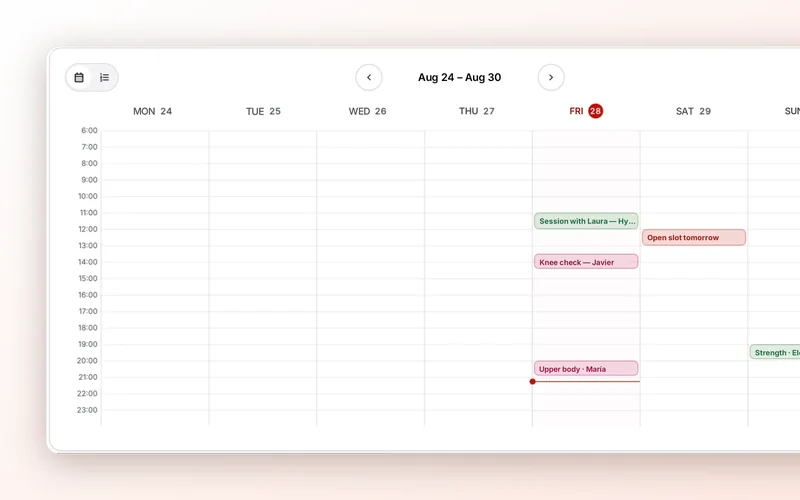
In 2T4T, go to the calendar (“Agenda”), click new appointment (“Nueva cita”) and fill in:
- Client, day, time and duration in minutes.
- Type: in person, video call or check-in. Check-ins work well for a short monthly review.
- Address for in-person sessions, or video call link for online ones: paste the link from whatever tool you use. Save the address or link and reuse it next time.
- Repeat: every week, every 2 weeks or every 4 weeks. It creates 4 appointments at once.
With Marta, who trains with you Tuesdays at 7 pm, you create the appointment once, set it to repeat every week, and the month is done.
Open slots and let clients request them
Instead of asking every client when they’re free, show them when you are. Open your free slots for the week and let each client pick.
In 2T4T, if you create an appointment without choosing a client, that slot stays open and your clients see it in their app so they can request it. Once someone requests it, it’s no longer open for the others.
Your client can also request a custom appointment, on a day and time you haven’t opened. The app asks “What is this appointment for?” and offers ideas to get started (“Check my form”, “Question about my plan”, “Extra session”), so you know what it’s about before you reply. And if the time they pick overlaps with a slot you already have open, the app suggests “Request that slot”.
Answer requests in one click
Every request needs a clear answer, and a quick one. Requests wait for you under pending requests at the top of the calendar, and also in your chat with that client, along with the note they wrote. You have three options:
- Confirm: the appointment is booked.
- Decline: if it was one of your slots, it opens up again.
- Propose another time: pick a day, time and duration (15 to 240 minutes), and the client accepts it with “Accept time” or declines it from their app.
For video calls, your client sees the link as soon as the appointment is confirmed and joins with “Join video call”. If they need to cancel, they do it from the app: you see it in your calendar, and the app suggests they message you to explain why.
See plan sessions next to your appointments
If Diego has legs in his plan on Monday and you book him an in-person leg session on Tuesday, you’ll both be fighting the soreness. Appointments and the plan need to be seen together.
In the 2T4T calendar, the plan sessions button (“Sesiones del plan”) adds your clients’ weekly plan sessions to the calendar. They sit apart from appointments and have no time, because each client does them when they can, but they show you at a glance what everyone is training each day.
Cancellation policy: write it before you need it
Most cancellation problems come from not saying anything upfront. Decide your rules, write them down and share them with every client when they start:
- How much notice is needed to cancel at no cost, for example 24 hours.
- What happens with a late cancellation or a no-show: the session counts as done, it’s only made up if there’s a free slot that week…
- The same goes for you: if you cancel, you give the same notice and offer another time.
- One rule for everyone. The exceptions you make for one client end up becoming everyone’s rule.
And if someone cancels late, remind them once, without blame:
“No problem, Laura. Just a reminder that with less than 24 hours’ notice the session counts. Want me to offer you Thursday at the same time?”